You moved
all year.
Show it.

Bring your Strava data, your wearable data, or both. Get swipeable story cards you can post. About two minutes.

recaps made so far

StravaApple HealthGarminWhoopPolarGoogle FitCorosSuunto

Mix and match. Use Strava for workouts and a wearable for sleep and heart rate. Free, no sign up, nothing uploaded.
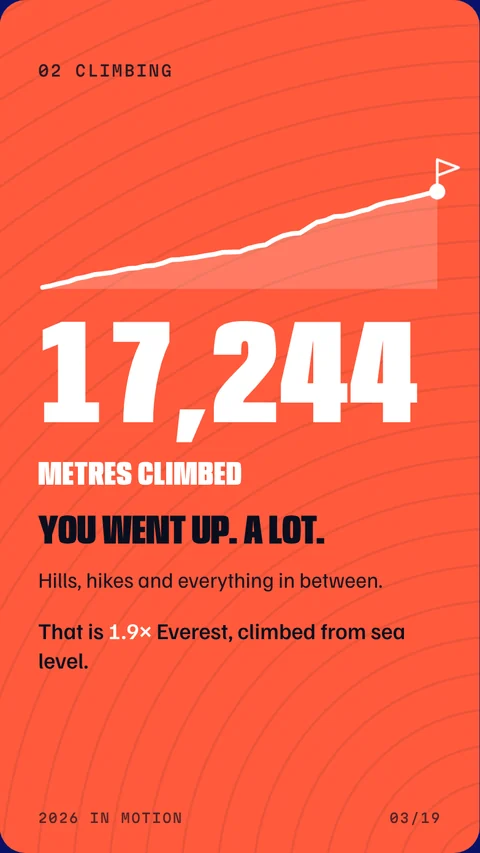
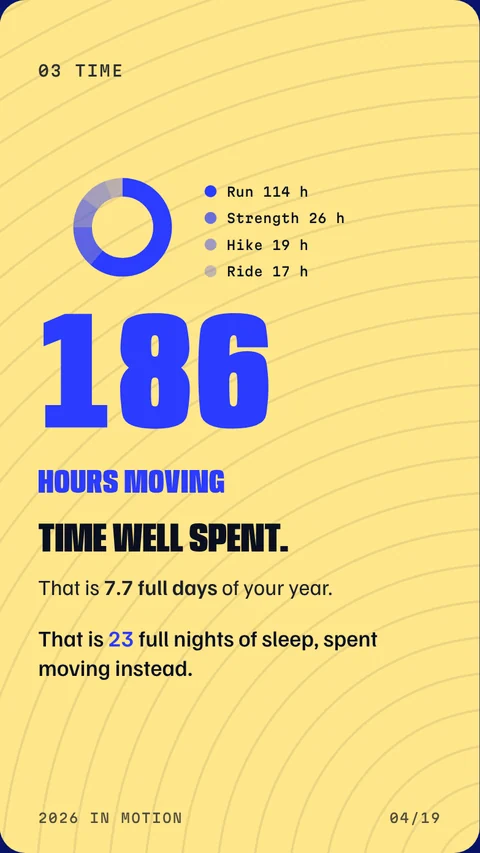
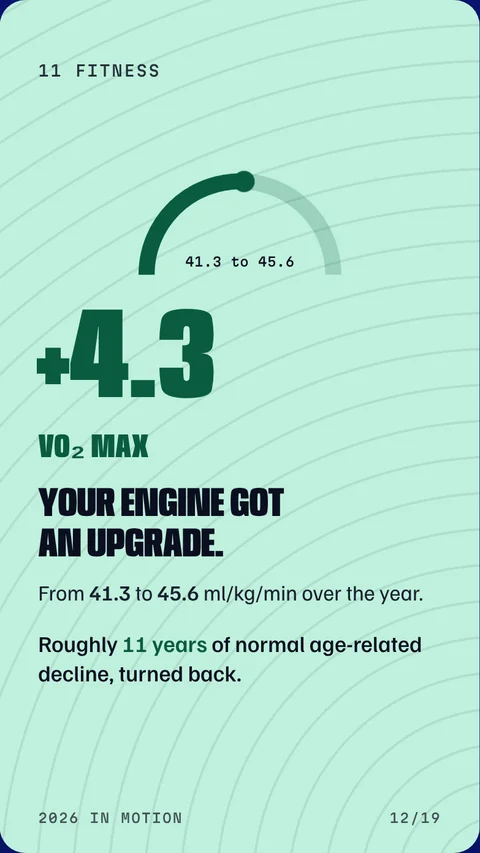
Sample card: 17,244 metres climbed Sample card: 186 hours moving Sample card: VO2 max up 4.3
Sample data

How it works

Three steps. The slow part is waiting for your export email.

01

Get your files

Ask Strava, Apple Health or your watch brand (Garmin, Whoop, Polar and more) for your data. It is a free download. Steps are below.

02

Drop them in

Open the app, press "Use my data" and drop everything in one box. It works out what each file is.

03

Post your stories

Swipe through, pick a look, then save the cards as images. Share them to Instagram from your phone.

Where to get your files

Pick the apps you use. Strava, wearables, or both. You only need one, and every extra source adds more cards.

1Stravaworkouts, pace, heart rate
  1. On the Strava website, open Settings, then My Account.
  2. Under "Download or Delete Your Account", press Get Started.
  3. Press Request Your Archive.
  4. Wait for the email, then download the zip.
Drop the zip in as it is. Do not unzip it.
No Strava subscription needed. The email can take a while to arrive.
2Apple HealthVO₂ max, resting heart rate, sleep, steps
  1. Open the Health app on your iPhone.
  2. Tap your picture in the top corner.
  3. Tap Export All Health Data.
  4. Send the zip to your computer, for example with AirDrop or email.
Drop export.zip in as it is. Big files take a minute to read.
Apple Health unlocks the health cards. Pair it with Strava for the full recap.
3Garminworkouts
  1. Sign in to Garmin Connect on the web.
  2. Open Activities, then All Activities.
  3. Scroll to load the whole year, then press Export CSV.
Or request everything at garmin.com/account/datamanagement and drop the zip in.
Garmin changes its export format now and then. If distances look wrong, open an issue on GitHub.
4Whoopresting heart rate, sleep, workouts
  1. Open the Whoop app, then Menu.
  2. Go to Data Export and request it.
  3. Download the zip from the email.
Drop the zip in as it is.
5Polarworkouts
  1. Go to account.polar.com and sign in.
  2. Open Download your data and request it.
  3. Download the zip when it is ready.
Drop the zip in as it is.
6Google Fitsteps
  1. Go to takeout.google.com.
  2. Press Deselect all, then tick only Fit.
  3. Create the export and download the zip.
Drop the zip in next to your workout files. Fit only adds steps, so you need workouts from another app too.
7Coros, Suunto and othersworkouts
These brands do not offer a full export. You have two options:
  1. Sync your watch to Strava and use the Strava export above. This is the easy one.
  2. Export your workouts one by one as .fit, .gpx or .tcx files and drop them all in together.

I have my files

Your files stay with you

Everything is read inside your own browser tab. Your files are not uploaded to a server, and there is no account.

There are no cookies and no tracking. The only thing we count is how many recaps get made: a plain +1, with nothing about you or your files. When you close the tab, your data is gone.

No sign upNo uploadNo trackingOpen source

Quick questions

Which file do I drop in?
The zip, exactly as you downloaded it. You can drop several files at once and the app sorts them out.
I only have Strava. Will it work?
Yes. You get your workout cards. You will not get the VO₂ max, resting heart rate, sleep and steps cards, because those need Apple Health or a similar source.
Why are some cards missing?
A card only shows up if your data has enough for it. No sleep data means no sleep card. This keeps every card honest.
How do I post to Instagram?
Press Save card for one card or Save all for a zip. On a phone, Save card opens the share sheet, so you can pick Instagram. The images are 1080 by 1920, the Stories size.
Is it really free?
Yes. It is open source, and it is a single page that runs on your device.
My numbers look off.
Open an issue on GitHub and say which app the file came from. Remove any personal details from what you share.

Cross the line.